Ets-lindgren 2090 Controller Manual do Utilizador
Consulte online ou descarregue Manual do Utilizador para Equipamento Ets-lindgren 2090 Controller. ETS-Lindgren 2090 Controller User Manual Manual do Utilizador
- Página / 178
- Índice
- RESOLUÇÃO DE PROBLEMAS
- MARCADORES

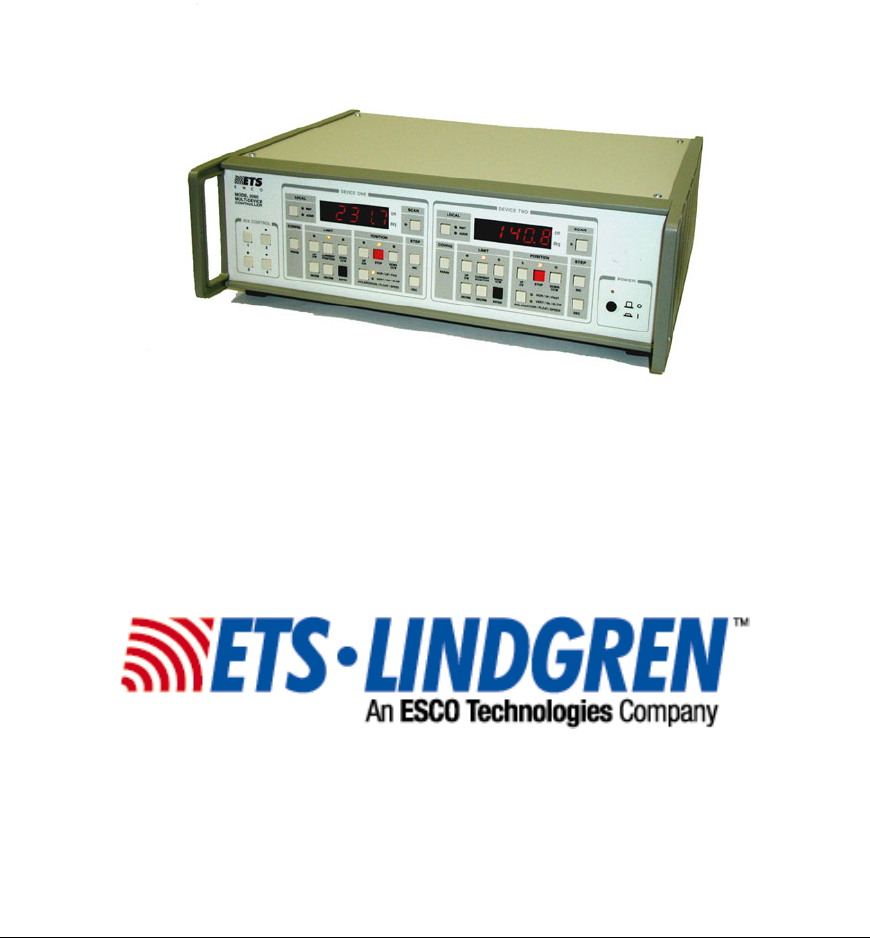
- Multi-Device 1
- Controller 1
- © ETS-Lindgren, April 2006 2
- Revision G– P#399199 2
- TABLE OF CONTENTS 3
- FIGURES 5
- CAUTION 6
- Error List 7
- Parameter List 8
- KEYBOARD NAVIGATION 9
- © ETS-Lindgren– April, 2006 10
- Revision G– P# 399199 10
- INTRODUCTION 11
- APPLICATIONS 12
- FEATURES 13
- ELECTRICAL 16
- PHYSICAL 16
- OPTIONAL FEATURES 17
- PREPARATION FOR USE 19
- FRONT PANEL DESCRIPTION 20
- 8. 8. 8. 8. 8 21
- POWER REQUIREMENTS 32
- RACK MOUNTING 33
- DEVICE CONNECTIONS 33
- OPTIONAL DEVICE CONNECTIONS 35
- GPIB INTERCONNECTIONS 36
- INITIALIZATION 37
- EDITING PARAMETERS 40
- 2090 Default Configuration: 43
- MODEL 2090 PARAMETER LIST 45
- 1.07a, for 52
- P1, P2, and C at a minimum 53
- OPERATION 55
- USING LOCAL FUNCTIONS 56
- USING POSITION FUNCTIONS 56
- P8) before moving in 57
- USING LIMIT FUNCTIONS 58
- USING THE SCAN FUNCTION 59
- USING THE STEP FUNCTIONS 60
- CHANGING POLARIZATION 60
- E006) error and 61
- P4) on a 62
- CHANGING SPEEDS 63
- OC parameter be 65
- USING A BORE SIGHT TOWER 67
- USING A REVERBERATION PADDLE 69
- REMOTE OPERATIONS 71
- USING THE GPIB COMMAND SET 73
- WITH THE MODEL 2090 73
- TYPICAL FLOW OF CODE: 75
- CODE SAMPLE 1 76
- CODE SAMPLE 2 77
- GPIB STATUS REPORTING 82
- APPENDIX A: MODEL 2090 GPIB 97
- COMMAND REFERENCE 97
- GPIB COMMANDS 101
- Detailed Command List 104
- Revision G– P#399199 105
- APPENDIX B: MAINTENANCE 137
- WARRANTY 138
- INSTALLING FLASH ROMS 140
- E001 error in the 145
- FLASH CODE” in the display 145
- PGRADING THE MODEL 2090 147
- FLASH r1.00” followed by 149
- PGRADING MOTOR BASES 150
- CODE REFERENCE 157
- TROUBLESHOOTING ERROR CODES 158
- E002 after a few seconds 160
- APPENDIX D: PARAMETER 165
- SETTINGS 165
- Scope and 167
- Duration of Warranties 167
- Warranty Exclusions 168
- Buyer’s Remedies 169
- Upgrades and Revisions 171
- Copyright Notice 172
- TECHNICAL SUPPORT 173
- EUROPEAN COMMUNITY 175
- DECLARATION OF CONFORMITY 175
Resumo do Conteúdo
Model 2090 Series Multi-Device Controller MANUAL ©ETS-Lindgren, April, 2006 Revision G – P# 399199
Keyboard Navigation Model 2090 Multi-Device Controller This page intentionally left blank. 10 © ETS-Lindgren– April, 2006 Revision G– P# 39919
Appendix A: Model 2090 GPIB Command Reference Model 2090 Multi-Device Controller 2090 Command Set: AIR Set flotation mode of an air flotation tur
Model 2090 Multi-Device Controller ALPHABETICAL LIST OF MODEL 2090 GPIB COMMANDS CMD Description CompatibilityAIR Set flotation mode of an air
Appendix A: Model 2090 GPIB Command Reference Model 2090 Multi-Device Controller S? Query speed selection on a two speed/variable speed device 2
Model 2090 Multi-Device Controller *TST? Self Test 1090, 2090*WAI Wait To Continue 1090, 2090 1 These commands are not supported by the Model 2
Appendix A: Model 2090 GPIB Command Reference Model 2090 Multi-Device Controller Detailed Command List AIR Compatibility: 2090 Description: Act
Model 2090 Multi-Device Controller AUX#? Compatibility: 2090 (Firmware Rev. 3.00) Description: Queries the state of the specified auxiliary device
Appendix A: Model 2090 GPIB Command Reference Model 2090 Multi-Device Controller CC Compatibility: All Description: Instructs the turntable to
Model 2090 Multi-Device Controller CL? Compatibility: 1090, 2090 Description: Queries the turntable's counterclockwise limit. The value retur
Appendix A: Model 2090 GPIB Command Reference Model 2090 Multi-Device Controller CP Compatibility: 1090, 2090 Description: Changes the current
Model 2090 Multi-Device Controller CY Compatibility: 1090, 2090 (Updated to half cycle scans in V2.30) Description: Changes the cycle count for the
Model 2090 Multi-Device Controller INTRODUCTION The Model 2090 Multi-Device Positioning Controller is designed for use with ETS-Lindgren positioning
Appendix A: Model 2090 GPIB Command Reference Model 2090 Multi-Device Controller DIR? Compatibility: 2090 (Firmware Rev 3.00) Description: Que
Model 2090 Multi-Device Controller ERE Compatibility: 2090 (Firmware Rev 2.3) Description: Set Device Dependent Error Enable Register. Causes chan
Appendix A: Model 2090 GPIB Command Reference Model 2090 Multi-Device Controller ERR? Compatibility: 2090 (Firmware Rev 2.3) Description: Quer
Model 2090 Multi-Device Controller LD Compatibility: 1050, 1060 Description: Loads a position/limit value. Used for the setting of the CP, CL, LL,
Appendix A: Model 2090 GPIB Command Reference Model 2090 Multi-Device Controller LH? Compatibility: 1090, 2090 Description: Queries the lower
Model 2090 Multi-Device Controller LL Compatibility: 1090, 2090 Description: Changes the lower limit of the device. The specified value must be le
Appendix A: Model 2090 GPIB Command Reference Model 2090 Multi-Device Controller LV Compatibility: 1090, 2090 Description: Changes the lower li
Model 2090 Multi-Device Controller N2 Compatibility: 2090 Description: Places the controller in the 2090 compatible numeric mode two. This mode pr
Appendix A: Model 2090 GPIB Command Reference Model 2090 Multi-Device Controller PH Compatibility: All Description: Instructs a tower to change
Model 2090 Multi-Device Controller S# Compatibility: 2090 (Firmware Rev 2.1) Description: Changes the speed selection of a two speed or variable sp
Introduction Model 2090 Multi-Device Controller keys and indicators to allow the user to manually toggle the auxiliary devices on or off. Control
Appendix A: Model 2090 GPIB Command Reference Model 2090 Multi-Device Controller SC? Compatibility: 2090 (Firmware Rev. 3.00) Description: Que
Model 2090 Multi-Device Controller SK Compatibility: 1090, 2090 Description: Instructs the device to begin seeking for a preset target value. The t
Appendix A: Model 2090 GPIB Command Reference Model 2090 Multi-Device Controller SKN Compatibility: 2090 (Firmware Rev 2.3) Description: Instru
Model 2090 Multi-Device Controller See Also: SK 2090, SKN, SKR SKR Compatibility: 2090 (Firmware Rev 2.3) Description: Instructs the device to
Appendix A: Model 2090 GPIB Command Reference Model 2090 Multi-Device Controller SS#? Compatibility: 2090 (Firmware Rev 2.25, Updated in Rev 3.0
Model 2090 Multi-Device Controller TG? Compatibility: 1090, 2090 Description: Query the seek target for the device. The value returned is either i
Appendix A: Model 2090 GPIB Command Reference Model 2090 Multi-Device Controller TYP? Compatibility: 2090 Queries the current device type confi
Model 2090 Multi-Device Controller UL Compatibility: 1050, 1060 Description: Queries the tower's upper limit. UL returns the limit assoc
Appendix A: Model 2090 GPIB Command Reference Model 2090 Multi-Device Controller UL? Compatibility: 1090, 2090 Query the upper limit of the dev
Model 2090 Multi-Device Controller UV? Compatibility: 2090 Description: Queries the upper limit of the device for vertical polarity. The value ret
Model 2090 Multi-Device Controller PATTERN ANALYSIS With the Model 2090, the user can have manual or automated control of the turntable rotation func
Appendix A: Model 2090 GPIB Command Reference Model 2090 Multi-Device Controller WL Compatibility: Devices: + Necessary for negative values Dec
Model 2090 Multi-Device Controller ZERO? Compatibility: 2090 (Firmware Rev 3.00) Description: Queries if the device is equipped with an absolute z
Appendix A: Model 2090 GPIB Command Reference Model 2090 Multi-Device Controller IEEE 488.2 Mandatory Instruction Set: *CLS Description: Clear St
Model 2090 Multi-Device Controller *ESR? Description: Query the Standard Event Status Register. This command readies the instrument to respond wit
Appendix A: Model 2090 GPIB Command Reference Model 2090 Multi-Device Controller *OPC Description: Arm Operation Complete Flag. Causes the con
Model 2090 Multi-Device Controller *SRE? Description: Query Service Request Enable Register. Prepares controller to respond with the contents of t
Appendix A: Model 2090 GPIB Command Reference Model 2090 Multi-Device Controller *TST? Description: Self Test. Prepares the controller to resp
Model 2090 Multi-Device Controller APPENDIX B: MAINTENANCE The following sections describe various field maintenance that may be performed on the M
Appendix B: Maintenance Model 2090 Multi-Device Controller 2. Disconnect all power and cables from the Model 2090 and move it to an open work are
Model 2090 Multi-Device Controller 8. Reconnect all cables and power up the Model 2090. After a moment, all of the indicators should flash and then
Introduction Model 2090 Multi-Device Controller COMPATIBILITY • Compatible with the a variety of commercial software including the following: H
Appendix B: Maintenance Model 2090 Multi-Device Controller CAUTION: System will not function properly if jumper settings are not as shown on the p
Model 2090 Multi-Device Controller not offer flash upgrade support and will have to be replaced in order to provide full flash capability. In order t
Appendix B: Maintenance Model 2090 Multi-Device Controller J10J11J2J7SUPERCAPJ6U7 U4U2U3U1LOU6MC68332U5HIRAMROMRAMROMJ4J9J5BJ5AJ1J3ABCDEFVERSIONIN
Model 2090 Multi-Device Controller 2. all power and cables from the Model 2090 and move it to an open work area. 3. 4. 5. out of its socket with
Appendix B: Maintenance Model 2090 Multi-Device Controller labels for orientation. Gently place each chip in its d the pins inward to lign them p
Model 2090 Multi-Device Controller 11. Reconnect all cables and power up the Model 2090. After a moment, all of the indicators should flash and then
Appendix B: Maintenance Model 2090 Multi-Device Controller (out-to-in and in-to-out) and that the device(s) are powered on. If none of these op
Model 2090 Multi-Device Controller NOTE to 2088 and 5901 users: Upgrading older 2088 or 5901 motor bases to V1.10a will likely cause a change in perfo
Appendix B: Maintenance Model 2090 Multi-Device Controller INSTALLATION AND UPGRADING Refer to any documentation provided with the flash upgrade u
Model 2090 Multi-Device Controller show the target version from the upgrade file. The boxes under “UDC Firmware Information” will also indicate if er
Model 2090 Multi-Device Controller GPIB INTERFACE • Complies with IEEE 488 industry standards (488.1 and 488.2 compatible). • All front panel functi
Appendix B: Maintenance Model 2090 Multi-Device Controller WARNING: Do not cycle power or otherwise interrupt the firmware download process, or m
Model 2090 Multi-Device Controller download from the ETS-Lindgren web site at www.ets-lindgren.com. MB-V IDENTIFICATION The MB-V interface can be
Appendix B: Maintenance Model 2090 Multi-Device Controller COMPATIBILITY The upgrade utility is designed to support the National Instruments line
Model 2090 Multi-Device Controller When communicating properly, the program will display the current interface type in the “Interface Type:” window an
Appendix B: Maintenance Model 2090 Multi-Device Controller e upgrade file from the program, “Check” as it performs t, possibly requiring a retur
Model 2090 Multi-Device Controller communication with the motor base, it may be necessary to cycle power on the Model 2090, the motor base, or both.
Appendix B: Maintenance Model 2090 Multi-Device Controller This page intentionally left blank. 156 © ETS-Lindgren– April, 2006 Revision G– P#
Model 2090 Multi-Device Controller APPENDIX C: MODEL 2090 ERROR CODE REFERENCE ERROR CODES RECOVERABLE ERRORS: dicate a recoverable problem that
Appendix C: Model 2090 Error Code Reference Model 2090 Multi-Device Controller SYSTEM TEST FAILURES: that service is needed. In the event of such
Model 2090 Multi-Device Controller The following table gives typical causes for the recoverableerrors: NVM Initialization Error This error indicat
Introduction Model 2090 Multi-Device Controller STANDARD CONFIGURATION ELECTRICAL Voltage 90-250 VAC Frequency 44-440 Hz Fuse 2 A, 250 VAC Ti
Appendix C: Model 2090 Error Code Reference Model 2090 Multi-Device Controller normally, but the display does not change, or changes uld e taken t
Model 2090 Multi-Device Controller E003 p his error indicates that the device is still moving his error is more often caused by excessive overshoot r
Appendix C: Model 2090 Error Code Reference Model 2090 Multi-Device Controller cause this problem. On split phase motors, a failure of the start
Model 2090 Multi-Device Controller E007 Communication Lost This indicates that the Model 2090 has lost communication with the motor base. This is th
Appendix C: Model 2090 Error Code Reference Model 2090 Multi-Device Controller E009 Encoder Failure This error indicates that the Model 2090 has d
Model 2090 Multi-Device Controller APPENDIX D: PARAMETER SETTINGS PARAMETER SETTING FOR AMS-8050 AND 2188 SERIES MAPS Parameter Device 1 – Turnta
Appendix D: Parameter settings Model 2090 Multi-Device Controller This page intentionally left blank. 166 © ETS-Lindgren– April, 2006 Revisio
Model 2090 Multi-Device Controller WARRANTY STATEMENT: Scope andtion and test procedures and instruments. Duration of Warranties Seller warrants to
WARRANTY STATEMENT: Model 2090 Multi-Device Controller Warranty Exclusions TABILITY OR FITNESS FOR ANY PARTICULAR URPOSE OR USE OR OTHERWISE ON THE
Model 2090 Multi-Device Controller Buyer’s Remedies If Seller determines that any product fails to meet any warranty during the applicable warranty pe
Model 2090 Multi-Device Controller OPTIONAL FEATURES Option 1 I/O Ports: RF Switch, SPDT, four auxiliary devices ©ETS-Lindgren, April 2006 17 Re
WARRANTY STATEMENT: Model 2090 Multi-Device Controller by the Arbitrator may be entered in either the Federal District Court for the Western Distri
Model 2090 Multi-Device Controller Upgrades and Revisions inal handling fee, or downloaded from the ETS web site at http:\\www.emctest.com. ossible f
WARRANTY STATEMENT: Model 2090 Multi-Device Controller Copyright Notice his manual, the associated controller firmware, and any included software
Model 2090 Multi-Device Controller TECHNICAL SUPPORT When contacting ETS-Lindgren for technical assistance, please have the following information ava
Technical Support Model 2090 Multi-Device Controller This page intentionally left blank. 174 © ETS-Lindgren– April, 2006 Revision G– P# 399199
Model 2090 Multi-Device Controller EUROPEAN COMMUNITY DECLARATION OF CONFORMITY The EC Declaration of Conformity is the method by which EMC Test Syst
European Community Declaration of Conformity Model 2090 Multi-Device Controller This page intentionally left blank. 176 © ETS-Lindgren– April, 200
Model 2090 Multi-Device Controller INDEX A Air Flotation Turntable...71 Auxiliary Control Functions...
Index Model 2090 Multi-Device Controller 178 © ETS-Lindgren– April, 2006 Revision G– P# 399199 SC? ...
Introduction Model 2090 Multi-Device Controller This page intentionally left blank. 18 © ETS-Lindgren– April, 2006 Revision G– P# 399199
Model 2090 Multi-Device Controller PREPARATION FOR USE UNPACKING THE CONTROLLER The ETS-Lindgren Model 2090 Multi-Device Controller is shipped with
Model 2090 Multi-Device Controller ETS-Lindgren reserves the right to make changes to any products herein to improve functioning or design. Altho
Preparation for Use Model 2090 Multi-Device Controller FRONT PANEL DESCRIPTION DEVICE ONEPOWERDEVICE TWODECPOLARIZATION / FLOAT / SPEEDHOR / UP /
Model 2090 Multi-Device Controller DEVICE ONEDECPOLARIZATION / FLOAT / SPEEDHOR / UP / FASTVERT / DN / SLOWINCRM DECRMENTERPARAMINCSTOP DOWNCCWUPCWDOW
Preparation for Use Model 2090 Multi-Device Controller c. In edit mode (see below), pressing the LOCAL key will shift the display digit being edit
Model 2090 Multi-Device Controller CURRENT POSITION key – Pressing this key will display the current position of the primary device in the correspondi
Preparation for Use Model 2090 Multi-Device Controller position, parameter, or speed selection in the display window. For limits, position, and pa
Model 2090 Multi-Device Controller CLOCKWISE direction. Flashes to acknowledge user key-press of the DOWN/CCW key and to indicate that the target mot
Preparation for Use Model 2090 Multi-Device Controller b. For air-flotation turntables, this indicator lights solid to show that the air flotation
Model 2090 Multi-Device Controller 5. STEP KEYS INC (INCREASE) key – This key has two functions: a. Pressing this key while viewing position informat
Preparation for Use Model 2090 Multi-Device Controller 7. UNIT INDICATORS cm indicator – This indicator is lit for devices configured as towers, to
Model 2090 Multi-Device Controller Model 2090 Multi-Device Controller ©ETS-Lindgren, April 2006 29 Revision G– P#399199 STANDARD BACK PANEL DESCRIP
Model 2090 Multi-Device Controller TABLE OF CONTENTS MODEL 2090 QUICK REFERENCE ...
Preparation for Use Model 2090 Multi-Device Controller controls. They provide simple on/off control for remote devices fitted with an auxiliary de
Model 2090 Multi-Device Controller OPTIONAL BACK PANEL DESCRIPTION NC C NONC C NOAuxiliary ControlSwitchesNC C NOSW 1SW 2S
Preparation for Use Model 2090 Multi-Device Controller POWER REQUIREMENTS The Model 2090 accepts any AC power source input within the range of 115
Model 2090 Multi-Device Controller RACK MOUNTING The Model 2090 controller can be ordered with a rack mount option (Part # 540037). This option can
Preparation for Use Model 2090 Multi-Device Controller base interface provides a secondary interface reserved for future expansion. Additional dev
Model 2090 Multi-Device Controller OPTIONAL DEVICE CONNECTIONS NC C NONC C NONC C NOSW 1SW 2SW 3SW 4 Auxiliary devices use
Preparation for Use Model 2090 Multi-Device Controller GPIB INTERCONNECTIONS The Model 2090 is compatible with the General Purpose Interface Bus a
Model 2090 Multi-Device Controller INITIALIZATION STARTUP The devices that will be controlled by the Model 2090 must be properly connected to the co
Initialization Model 2090 Multi-Device Controller RECOVERABLE ERRORS: The following errors indicate a recoverable problem that may require user int
Model 2090 Multi-Device Controller HARDWARE ERRORS: The following errors are not limited to the startup process, and should not occur under normal ope
Model 2090 Multi-Device Controller FLASH UPGRADING MOTOR BASES ...
Initialization Model 2090 Multi-Device Controller EDITING PARAMETERS The Model 2090 provides a versatile user interface for editing configuration
Model 2090 Multi-Device Controller NOTE: In order to toggle the polarization of the tower from the front panel, the display must be showing the curren
Initialization Model 2090 Multi-Device Controller or activate specific controller functions. The edit behavior of these parameters is described in
Model 2090 Multi-Device Controller CONFIGURING FOR USE Before using the Model 2090, it must be configured to match the primary devices connected to
Initialization Model 2090 Multi-Device Controller SND 1 Remote sounds enabled Lower Limit: 050.0 cm Upper Limit: 400.0 cm Current Position:
Model 2090 Multi-Device Controller MODEL 2090 PARAMETER LIST The following table describes each parameter and the available settings. In general, t
Model 2090 Parameter List Model 2090 Multi-Device Controller P4Refers to two different tower corrections, depending on the tower type: For a sta
Model 2090 Multi-Device Controller P8 Refers to the motor reverse delay, in seconds. This parameter allows setting the reverse delay used between di
Model 2090 Parameter List Model 2090 Multi-Device Controller Model 2081 Turntables: 3608 Model 2088 EuroPro Turntable: 4500* Model 5901 Mode Tune
Model 2090 Multi-Device Controller ring (masking tape works well), and set the current position reading to 000.0. 4. Using the STEP keys, rotate the
Model 2090 Multi-Device Controller FIGURES Figure 1 Model 2090 Front Panel...
Model 2090 Parameter List Model 2090 Multi-Device Controller S1-S8 Refers to the eight possible preset speed settings for variable speed devices.
Model 2090 Multi-Device Controller OSCLr Invokes the Overshoot Clear menu option. Pressing the ENTER key will display SURE in the display. Pressing
Model 2090 Parameter List Model 2090 Multi-Device Controller ZERO Invokes the Zero Reference menu option. Pressing the ENTER key will display SUR
Model 2090 Multi-Device Controller SND This is the sound configuration setting for the motorbase speaker. The motorbase can output audible indication
Model 2090 Parameter List Model 2090 Multi-Device Controller This page intentionally left blank. 54 © ETS-Lindgren– April, 2006 Revision G– P#
Model 2090 Multi-Device Controller OPERATION MANUAL OPERATIONS The front panel of the Model 2090 provides the interface for two separate and complet
Operation Model 2090 Multi-Device Controller USING LOCAL FUNCTIONS Pressing the LOCAL function key will cause the Model 2090 to exit remote mode
Model 2090 Multi-Device Controller equipped with variable speed control) and then the STOP motion indicator will illuminate for the Reverse Delay peri
Operation Model 2090 Multi-Device Controller TO STOP MOTION To stop device motion, press the STOP key. The device will decelerate (if equipped wit
Model 2090 Multi-Device Controller The lower limit must always be less than or equal to the upper limit. USING THE SCAN FUNCTION The SCAN key contro
Model 2090 Multi-Device Controller SAFETY SYMBOL DEFINITIONS ! REFER TO MANUAL When product is marked with this symbol refer to instruction ma
Operation Model 2090 Multi-Device Controller USING THE STEP FUNCTIONS The STEP functions can move a device in “momentary” increments using the t
Model 2090 Multi-Device Controller For towers equipped with air polarization, pressing the POLARIZATION key, while the current position is shown in th
Operation Model 2090 Multi-Device Controller a small overshoot tolerance on this value, so, for example, a current position of 99.5 will not cause
Model 2090 Multi-Device Controller POLARIZATION VIOLATION AND LIMITS A common source of confusion is the Polarization Limits Violation (E006) ) desig
Operation Model 2090 Multi-Device Controller For two speed turntables, pressing the SPEED key will toggle the speed control relay in the motor base
Model 2090 Multi-Device Controller indicators will light to represent the lower two bits of the speed selection in a binary fashion as shown below:
Operation Model 2090 Multi-Device Controller USING AUXILIARY CONTROL FUNCTIONS The four auxiliary control ports on the rear panel of the Model 20
Model 2090 Multi-Device Controller USING A BORE SIGHT TOWER To configure a Bore Sight tower, do the following: Set P1 to 1 ; Define device as a t
Operation Model 2090 Multi-Device Controller CADISTANCE TO EUT1 METERADJUSTED HEIGHTRRIER HEIGHT Figure 5 Bore sight geometry for standard bore s
Model 2090 Multi-Device Controller USING AN AIR FLOTATION TURNTABLE To configure an Air Flotation turntable do the following: Set P1 to 0 ; Define d
Model 2090 Multi-Device Controller MODEL 2090 QUICK REFERENCE Error List Errors less than E100 can be cleared by pressing any key on the front panel
Operation Model 2090 Multi-Device Controller USING A MULTI-AXIS POSITIONER To configure a MAPS do the following for both devices: Set P1 to 0 ; D
Model 2090 Multi-Device Controller REMOTE OPERATIONS The RMT indicator under LOCAL on the front panel of the controller indicates that the associate
Operation Model 2090 Multi-Device Controller This page intentionally left blank. 72 © ETS-Lindgren– April, 2006 Revision G– P# 399199
Model 2090 Multi-Device Controller USING THE GPIB COMMAND SET WITH THE MODEL 2090 The ETS-Lindgren Model 2090 controller has a large command set cove
Using the GPIB Command Set with the Model 2090 Model 2090 Multi-Device Controller IEEE 488.2 standard does not allow one behavior of the older cont
Model 2090 Multi-Device Controller the default setting. The software must issue the N2 command before floating point mode is enabled. The numeric mo
Using the GPIB Command Set with the Model 2090 Model 2090 Multi-Device Controller CODE SAMPLE 1 The following code segment gives a brief example o
Model 2090 Multi-Device Controller controlling program, the only reason a program needs to check the current position is to update a position display
Using the GPIB Command Set with the Model 2090 Model 2090 Multi-Device Controller ibwrt Table%, "CP?" ' Query turn
Model 2090 Multi-Device Controller StartTime = Timer ' Read current timer count While (Timer < StartTime + 3) &apo
Model 2090 Multi-Device Controller Parameter List P1 Device Type: (0 = rotational positioner, 1 = linear positioner) P2 Device Sub-Type: (0 = St
Using the GPIB Command Set with the Model 2090 Model 2090 Multi-Device Controller TowerEdit.Text = "Polarizing" ' Inform
Model 2090 Multi-Device Controller ' ibwrt Tower%, "ST" ' Stop tower ibwrt Table%, "ST"
Using the GPIB Command Set with the Model 2090 Model 2090 Multi-Device Controller GPIB STATUS REPORTING The Model 2090 supports the ANSI/IEEE 488.
Model 2090 Multi-Device Controller gure 6 Status Reporting Model The Service Request Enable Register allows the bits of the Status Byte Register to
Using the GPIB Command Set with the Model 2090 Model 2090 Multi-Device Controller Byte Register is TService Request ETRUE ue to a command from the
Model 2090 Multi-Device Controller Status (MSS) remaining bits of the Status Byte Register and the Status Byte Enable Register is non-zero. This val
Using the GPIB Command Set with the Model 2090 Model 2090 Multi-Device Controller The Serial Poll Response Byte is the value returned to the contro
Model 2090 Multi-Device Controller Bit Name Description 1 - Parameters Lost Set at startup if the Model 2090 detects that previous settings have
Using the GPIB Command Set with the Model 2090 Model 2090 Multi-Device Controller As long as bits are set in this register, any commands related to
Model 2090 Multi-Device Controller range, or when a device dependent error prevents execution of the command. 5 - Command Error Set when an invalid GP
Model 2090 Multi-Device Controller KEYBOARD NAVIGATION To return to local operation – when RMT indicator lit, pressing LOCAL restores local operation.
Using the GPIB Command Set with the Model 2090 Model 2090 Multi-Device Controller The Output Queue is the buffer which holds information to be retu
Model 2090 Multi-Device Controller Read$ = Space$(50) ' ' Initialize the tower ' ibdev 0, 8, 0, T10s, 1, &HC0A, Tower% ' Ini
Using the GPIB Command Set with the Model 2090 Model 2090 Multi-Device Controller ibwrite Tower%, "LV 200" ' Set lower
Model 2090 Multi-Device Controller ' ' This function handles service requests detected during writes. ' The GPIB card must be configur
Using the GPIB Command Set with the Model 2090 Model 2090 Multi-Device Controller MsgBox Msg$, 0, "Command Error" End If If
Model 2090 Multi-Device Controller End If If (DDE And 256) Then 'Flotation Violation Msg$ = "The controller re
Using the GPIB Command Set with the Model 2090 Model 2090 Multi-Device Controller This page intentionally left blank. 96 © ETS-Lindgren– April, 20
Model 2090 Multi-Device Controller APPENDIX A: MODEL 2090 GPIB COMMAND REFERENCE The following is a complete GPIB command reference for the Model 2
Appendix A: Model 2090 GPIB Command Reference Model 2090 Multi-Device Controller LIST OF MODEL 2090 GPIB COMMANDS 1050/51/53 Command Set Supporte
Model 2090 Multi-Device Controller LL Set lower limits (both horizontal and vertical) LL? Query lower limits LV Set vertical lower limit LV? Que
Manuais e produtos relacionados com Equipamento Ets-lindgren 2090 Controller
 (48 páginas)
© 2020, manymanuals-pt.com. Todos os direitos reservados. | 0.047 s |
 Manymanuals.com
 Manymanuals.de
 Manymanuals.fr
 Manymanuals.it
 Manymanuals.pl
 Manymanuals.cz
 Manymanuals.es
 Manymanuals-pt.com
Comentários a estes Manuais